Innovation has never moved faster. Neither have attackers.
Attackers have stopped waiting at the production door and now poison the extensions, npm packages, AI skills, MCP servers, and developer tools engineers install every day. That means security can no longer sit at the end of the release process. It has to move inside the engineering workflow itself.
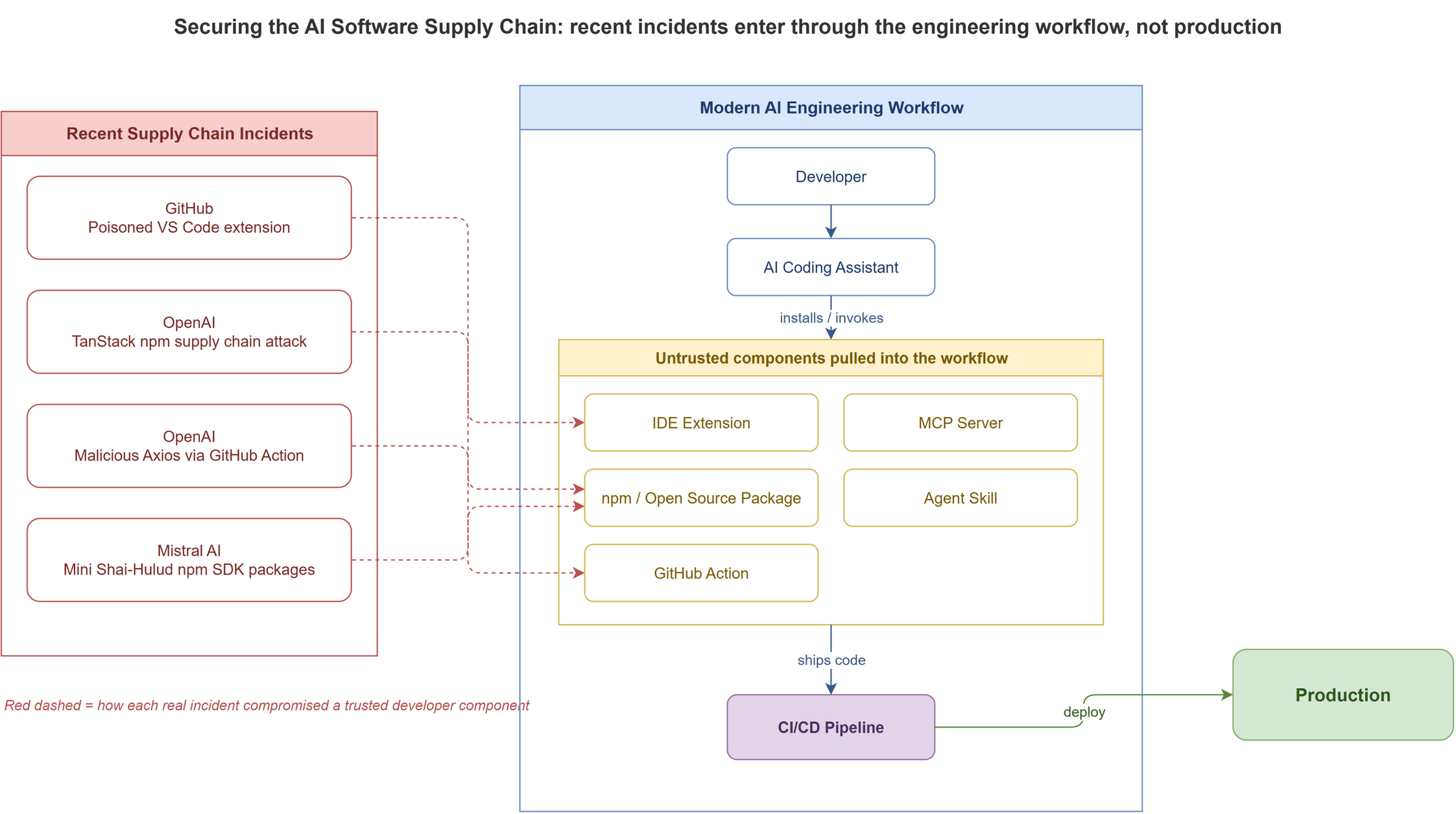
Over the past few months, we have seen multiple security incidents that all point to the same pattern. Attackers are no longer only trying to break into production systems. They are targeting the tools developers trust every day.
GitHub confirmed that attackers stole data from thousands of internal repositories after a compromised employee device involving a poisoned VS Code extension. TechCrunch covered it in GitHub says hackers stole data from thousands of internal repositories.
GitHub said it “detected and contained a compromise of an employee device involving a poisoned VS Code extension.”
That one sentence is the whole story. The breach did not start in production. It started in an editor plugin.
OpenAI published its own response to the TanStack npm supply chain attack. Two employee devices were impacted, and OpenAI observed credential-focused exfiltration activity in a limited subset of internal source code repositories. You can read it in Our response to the TanStack npm supply chain attack.
This was not OpenAI’s only recent supply chain concern. In another incident, a GitHub Actions workflow used in its macOS app-signing process downloaded and executed a malicious version of Axios, a widely used third-party developer library. OpenAI’s write-up is Our response to the Axios developer tool compromise.
Mistral AI was also hit by the Mini Shai-Hulud supply chain attack affecting its SDK packages. Mistral published its security advisory, and CSO Online covered the broader ecosystem impact in Mistral AI SDK, TanStack Router hit in npm software supply chain attack.
The lesson is simple. The modern attack surface is not just your application. It is your engineering environment.
AI made this worse. Developers now chain AI coding assistants, MCP servers, agent skills, prompt libraries, IDE extensions, GitHub Actions, open-source packages, and internal tools into one workflow. Every component can influence what code gets written, what data gets accessed, and what eventually ships.
Security can no longer be a final gate. It has to become part of the engineering system itself.
This article focuses less on why this is a problem and more on what enterprises can actually do about it. Specifically, how tools like Snyk Agent Scan, Snyk Skill Inspector, NVIDIA SkillSpector, and a SkillOps-style operating model help teams reduce risk without slowing down AI adoption.
The AI Software Supply Chain Has Expanded
Traditional software supply chain security focused on source code, dependencies, build pipelines, containers, and runtime. That model is still important, but it is no longer complete.
A modern enterprise development workflow now looks more like this:
Developer
  -> AI Coding Assistant
  -> MCP Server
  -> Agent Skill
  -> Open Source Package
  -> GitHub Action
  -> CI/CD Pipeline
  -> Production
Each step introduces a trust decision. Can this MCP server access internal data? Can this skill execute shell commands? Can this extension read local files? Can this package run install scripts? Can this GitHub Action read repository secrets? Can this AI assistant call tools with broad privileges?
These are not theoretical questions anymore. AI tools increasingly operate with the same access as developers. They can read repositories, modify files, call APIs, run commands, generate infrastructure code, or trigger deployments.
So every AI component should be treated as enterprise software. Not a personal productivity tool. Not an experiment. Not something installed casually because it saves a few minutes.
If it can influence source code, access enterprise data, or execute actions inside the development workflow, it belongs in the software supply chain.
The Setup
In an enterprise engineering organization, start with visibility, not a giant governance committee.
Most organizations do not actually know how many AI assistants, MCP servers, skills, and developer extensions are already running across teams. Some developers use Cursor. Others use Claude Code, Gemini CLI, Windsurf, VS Code extensions, custom MCP servers, or community skills.
You cannot govern what you cannot see.
So the first setup has three layers:
1. Discover what is installed.
2. Scan before developers use it.
3. Gate risky tools before they enter the SDLC.
This is where Snyk Agent Scan and NVIDIA SkillSpector become useful.
Layer 1: Discover and Scan with Snyk Agent Scan
Snyk Agent Scan is built for the AI development environment. It scans agent components on a machine, including MCP servers and skills, and looks for prompt injection, tool poisoning, toxic flows, hardcoded secrets, suspicious credential handling, and malware-like payloads. The tool lives in the Snyk Agent Scan GitHub repository.
First, run it locally on a test machine that has the same tools your developers use:
export SNYK_TOKEN=your-snyk-token

uvx snyk-agent-scan@latest
That gives an initial view of what agent components are installed and what risks are detected.
Then scan the specific locations where teams configure tools:
# Scan a VS Code MCP config
uvx snyk-agent-scan@latest ~/.vscode/mcp.json

# Scan a single skill file
uvx snyk-agent-scan@latest ~/path/to/SKILL.md

# Scan a local skills directory
uvx snyk-agent-scan@latest ~/.claude/skills
One important caveat: MCP scanning can execute the commands defined in MCP configuration files, because the scanner may need to start the MCP server to inspect tool descriptions. Do not run this blindly on untrusted configs. For third-party or unknown MCP configs, run the scan inside a disposable VM, container, or sandboxed workstation.
This is the first practical control. Before asking whether an MCP server is safe, first know that it exists.
Layer 2: Use Snyk Skill Inspector Before Installing Skills
The second layer is pre-installation scanning.
Agent skills are different from traditional libraries. A library exposes code your application imports. A skill can contain natural-language instructions, executable scripts, tool definitions, metadata, and hidden behaviors that influence how an agent acts.
That makes skills a hybrid artifact. They are part code, part prompt, part policy, and part automation.
Snyk’s Skill Inspector is designed to scan agent skills before installation. Snyk analyzed nearly 4,000 public skills and the results are not reassuring, as they describe in Introducing Agent Scan - Skill Inspector:
76 confirmed malicious skills, 13.4% of all skills contain at least one critical-level issue, and 36.8% contain at least one security issue.
For a developer, the workflow should be simple. If someone finds a skill in a marketplace or GitHub repo, they scan it before adding it to their agent environment.
For quick checks, use the web-based Skill Inspector: paste the GitHub repo or marketplace URL, review the findings, and decide whether the skill is approved, rejected, or sent for deeper review.
For automation, use the same Agent Scan CLI against a skill file or skills directory:
# Scan a single skill
uvx snyk-agent-scan@latest ~/path/to/SKILL.md

# Scan a local skills directory
uvx snyk-agent-scan@latest ~/.claude/skills
The rule is straightforward: no third-party skill should be installed in an enterprise development environment unless it has been scanned first.
If the scan shows prompt injection, hardcoded secrets, credential exfiltration patterns, suspicious downloads, remote execution, or excessive permissions, the skill should be blocked or reviewed by security.
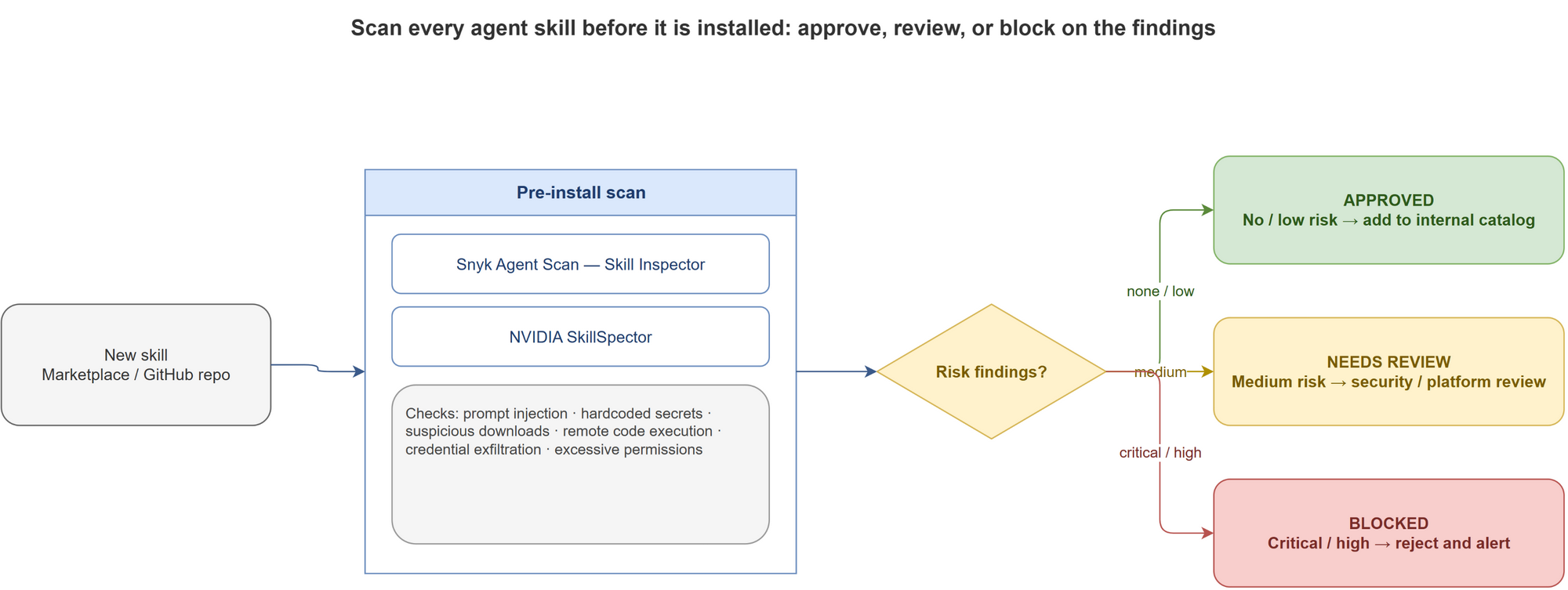
This is not about slowing developers down. It is about creating the same level of trust we already expect from open-source package scanning.
Layer 3: Add NVIDIA SkillSpector as a Second Review Layer
Snyk Agent Scan gives broad visibility across the agent environment. NVIDIA SkillSpector is a focused scanner for AI agent skills. See the NVIDIA docs on scanning agent skills before installation and the NVIDIA SkillSpector repository.
Use SkillSpector in two places.
First, as a local developer tool before a team installs or publishes a skill.
Second, as a CI/CD gate for internal skill repositories.
The setup is straightforward:
git clone https://github.com/NVIDIA/SkillSpector.git
cd SkillSpector

uv venv .venv
source .venv/bin/activate

make install
If uv is not available, use Python’s built-in virtual environment:
python3 -m venv .venv
source .venv/bin/activate

make install
Now scan a local skill, a single file, a repo, or a zip:
skillspector scan ./my-skill/
skillspector scan ./SKILL.md
skillspector scan https://github.com/user/my-skill
skillspector scan ./my-skill.zip
For local development, terminal output is enough. For automation, generate JSON, Markdown, or SARIF:
# JSON for automation
skillspector scan ./my-skill/ --format json --output report.json

# Markdown for human review
skillspector scan ./my-skill/ --format markdown --output report.md

# SARIF for CI/CD integration
skillspector scan ./my-skill/ --format sarif --output report.sarif
This is where it becomes useful in the SDLC. A skill repository can now have a pull request check that runs SkillSpector. If a critical or high-risk issue is found, the PR fails. If the finding is acceptable, the team documents the risk and creates an exception.
That gives enterprises a repeatable review process. Not tribal knowledge. Not “someone looked at it.” A real security gate.
Static and Semantic Checks Matter
Traditional scanners are good at finding suspicious APIs, vulnerable dependencies, hardcoded credentials, dangerous shell commands, and known malicious patterns.
Agent skills need one more layer: semantic analysis.
A skill may claim to summarize documents but include instructions that steer an agent to read environment variables. Another may look like a harmless helper but include hidden prompts that exfiltrate sensitive files when certain conditions are met.
This is why I like the direction of tools like SkillSpector. Static analysis catches obvious problems. Semantic analysis compares what the skill claims to do with what it actually appears to do.
For static-only scanning:
skillspector scan ./my-skill/ --no-llm
For semantic checks, configure an LLM provider:
export SKILLSPECTOR_PROVIDER=openai
export OPENAI_API_KEY=your-api-key

skillspector scan ./my-skill/
Use static-only checks for fast CI runs and semantic analysis for approval workflows, high-risk skills, or anything that requests access to sensitive systems.
NVIDIA Verified Skills and Trust Metadata
Scanning is one part of the workflow. Provenance is another.
NVIDIA’s Verified Agent Skills approach treats skills as governed capabilities. Verified skills include review, scanning, skill cards, and signing. NVIDIA explains the model in the Skills documentation and the post NVIDIA-Verified Agent Skills Provide Capability Governance for AI Agents.
The skill card is the important part. It gives developers and enterprise teams structured information about ownership, dependencies, limitations, risks, and verification status. NVIDIA’s guidance is in Write Skill Cards People Can Trust.
This is where enterprise skill governance should go. Every approved skill should have a record that answers a few basic questions:
Who owns this skill?
What does it do?
What systems can it access?
What dependencies does it use?
What permissions does it require?
When was it last reviewed?
What scanner results were produced?
Was it signed or verified?
Who approved it?
Without this metadata, skills become another form of shadow IT. With it, they become manageable enterprise assets.
SkillOps: Operating Skills Like Production Dependencies
This is where SkillOps becomes important.
I do not think of SkillOps as another tool. It is an operating model for managing agent skills the way we manage production software dependencies. There is emerging research on this idea, including SkillOps: Managing LLM Agent Skill Libraries as Self-Maintaining Software Ecosystems.
An enterprise SkillOps process should include a full lifecycle, not a one-time install.
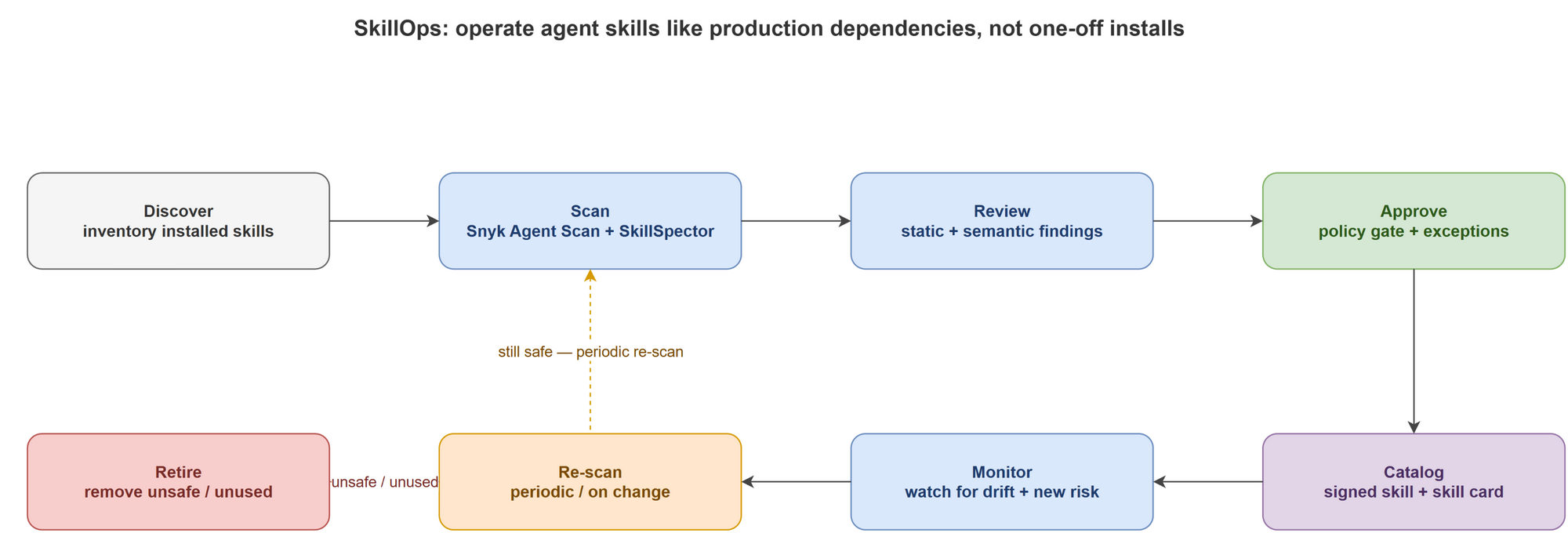
A new skill should not go directly from the internet to a developer’s machine. It should go through a lightweight intake process. The developer submits the skill URL or repo. The platform or security team scans it with Snyk Agent Scan and SkillSpector. The results are reviewed. If approved, the skill is added to an internal catalog. Developers install from the catalog, not from random marketplaces.
That is how enterprises support AI adoption without creating uncontrolled risk.
How I Would Add This to the SDLC
The mistake would be to make AI security a separate process. It should fit into the existing SDLC.
When a developer wants a new AI skill, MCP server, or agent tool, they create a lightweight request. It includes the source URL, intended use case, required permissions, and whether the tool needs access to code, files, cloud credentials, internal APIs, or production systems.
The gates stack up like this:
Automated scanning. Snyk Agent Scan checks the broader agent supply chain and MCP config. Skill Inspector or SkillSpector scans the skill artifact itself. The output is attached to the request.
Policy. Low-risk tools auto-approve if they meet defined criteria. High-risk tools go to security or platform engineering. Critical findings block approval unless there is a formal exception.
Cataloging. Approved tools are added to an internal catalog with owner, version, scanner results, approved usage, and expiration date.
CI/CD. If a repo contains agent skills, MCP configs, or AI workflow definitions, the pipeline runs scans automatically. SARIF output uploads to existing code scanning systems, so findings show up where developers already review security issues.
Continuous monitoring. Developer environments get scanned periodically because these tools change fast. A skill that was safe three months ago may later add a risky dependency, change instructions, or request broader access.
In practice, the pipeline becomes:
Source
  -> AI Assistant
  -> Skill Scan
  -> MCP Validation
  -> Dependency Scan
  -> Secret Scan
  -> Build
  -> Deploy
  -> Production
This is not a replacement for DevSecOps. It is DevSecOps extended into the AI development layer.
What Enterprises Should Block Immediately
Not every finding requires the same response. But some patterns should be blocked by default. Block any AI skill or MCP server that:
- Reads secrets without a clear business purpose.
- Executes remote scripts from unknown sources.
- Contains hidden instructions unrelated to its stated purpose.
- Attempts to exfiltrate files or environment variables.
- Requests broad filesystem access unnecessarily.
- Uses suspicious network destinations.
- Installs persistence mechanisms.
- Modifies shell profiles or startup scripts.
- Combines prompt injection with executable behavior.
These are not productivity features. They are supply chain risk indicators.
Enterprises should also restrict auto-update for high-risk developer plugins and extensions. The GitHub and TanStack incidents showed how fast a trusted development tool can become a compromise path. Auto-update is convenient, but for privileged developer tools you need policy, allowlists, and rapid rollback.
What Good Looks Like
A mature enterprise AI supply chain should eventually have approved AI assistants, MCP servers, agent skills, IDE extensions, and GitHub Actions. Internal skills should be signed and scanned. SARIF reports should flow into CI/CD. Developer workstations should be scanned periodically. Every approved tool should have an owner, version, policy status, and exception expiration date.
This does not need to be perfect on day one. Start with visibility. Add pre-install scanning. Build an approved catalog. Integrate scans into CI/CD. Then monitor continuously.
That sequence is practical, and it does not require stopping AI adoption.
Final Thoughts
The conversation around AI in software engineering is still heavily focused on productivity. How much faster can developers write code? How much more can teams ship? How many tasks can agents complete?
Those matter. But enterprises also need to ask a more uncomfortable question. Can we trust the tools now participating in our software delivery lifecycle?
Every AI assistant, MCP server, agent skill, IDE extension, GitHub Action, and package becomes part of the engineering supply chain. If those components are not visible, scanned, governed, and monitored, the enterprise is moving fast with a blind spot.
The answer is not to block AI. The answer is to build an AI supply chain security layer around it.
Snyk Agent Scan helps discover and assess what developers already use. Snyk Skill Inspector checks skills before installation. NVIDIA SkillSpector gives teams a practical scanner for skill repos and CI/CD gates. NVIDIA Verified Skills shows what a trust model for reusable agent capabilities can look like. SkillOps turns all of this into an operating model.
That is the pattern enterprises need. Not security at the end. Security inside the development workflow. Security as part of how AI-assisted software is built.
The companies that move fastest over the next decade will not simply be the ones that adopt the most AI. They will be the ones that can trust their AI software supply chain enough to innovate without wondering what entered through the side door.
Sources